How the LinkedIn Algorithm Decides What You’re an Expert In
LinkedIn keeps a file that scores what it thinks you’re an expert in, topic by topic. It’s called Inferred Credibility Scores, you can download it for free, and it explains why good posts reach the wrong people.
I got my first paid collaboration at 2,000 followers. My biggest consulting offer came at 2,500. Lorikeet noticed me when my posts averaged 30 to 40 likes, and I went on to make a video project for them that I’m still proud of. Somewhere in between, Dixa invited me to give a keynote.
If you’ve followed the usual LinkedIn advice (post every day, write a scroll-stopping hook, comment on big accounts) and nothing much changed, the problem isn’t you. That advice was written for an average account. Yours isn’t average.
Clients come from the right people seeing you as the person who knows their exact problem. A buyer only needs to find you once, at the right moment. Ten of those readers are worth more than ten thousand people who scroll past.
The right people only see you if LinkedIn understands who you are. Your credibility file shows whether it does. Below I’ll show you how to read it, then what shapes it. That includes how LinkedIn reads the industry on your profile, why your first two paragraphs choose your audience, and why saves matter more than likes.
The short version
| Finding | Detail |
|---|---|
| LinkedIn scores your credibility, topic by topic. | The "Inferred Credibility Scores" file rates how known you are, where you're an expert, and which broad category your writing belongs to. |
| You can download it for free. | Settings → Data privacy → Download your data. |
| Your first two paragraphs pick your audience. | The feed matches the words in your opening to people who engage with similar topics. The same argument with different vocabulary got 1,100 vs 5,600 impressions. |
| Saves predict growth better than likes. | My Retention Value Index (saves per 1,000 impressions) tracks followers and inbound leads more closely than reach does. |
I cover part of this guide in a video. The written version below is the complete one.
How to download your Inferred Credibility Scores
LinkedIn's data export now includes a file called "Inferred Credibility Scores." It replaced the older "Inferences" file, which only tagged your job, interests and traits. The new file scores you, and it tracks those scores over time.
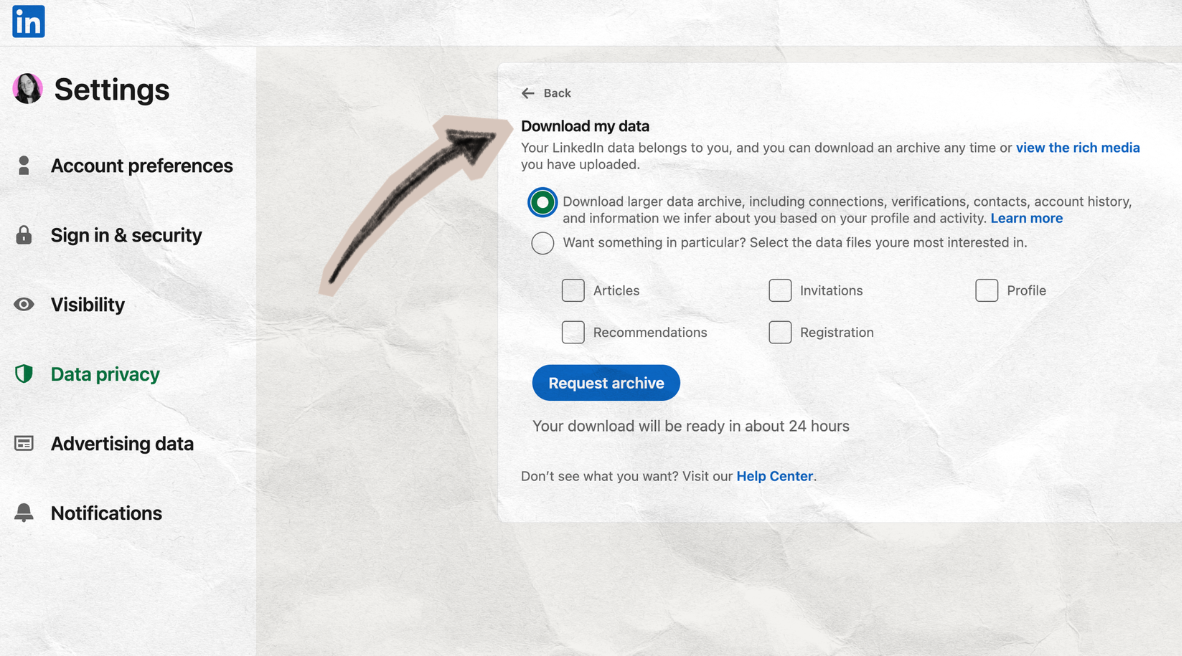
- Go to Settings → Data privacy → Download your data.
- Request the full archive, not individual categories.
- Wait for two emails. LinkedIn sends the basic export first. The detailed one, where the credibility file lives, took 24 to 48 hours for me.
- Open the file named "Inferred Credibility Scores" in the detailed export.
Got the file? Jump to the prompt that reads it for you
When I posted about the older Inferences file, 158 people saved it. Almost nobody had looked at theirs. The new file is far more detailed and much harder to read, so here's what's inside.
What's inside the file
The file mixes three scores that measure different things. Read them separately.
One caution before you read yours. LinkedIn hasn't published how these scores are used for distribution, search or job matching. What follows is what the file contains, plus what I observed on my own account.
1. Notability, or how known you are beyond your own posts
LinkedIn rates ten components from 0 to 5, blends them into one score, and records it again and again over time. When you read yours, look for the low components you could move.
Mine sat at 1.0 from February to April. It rose to 1.49 in mid-June, right after my Dixa Connect keynote.
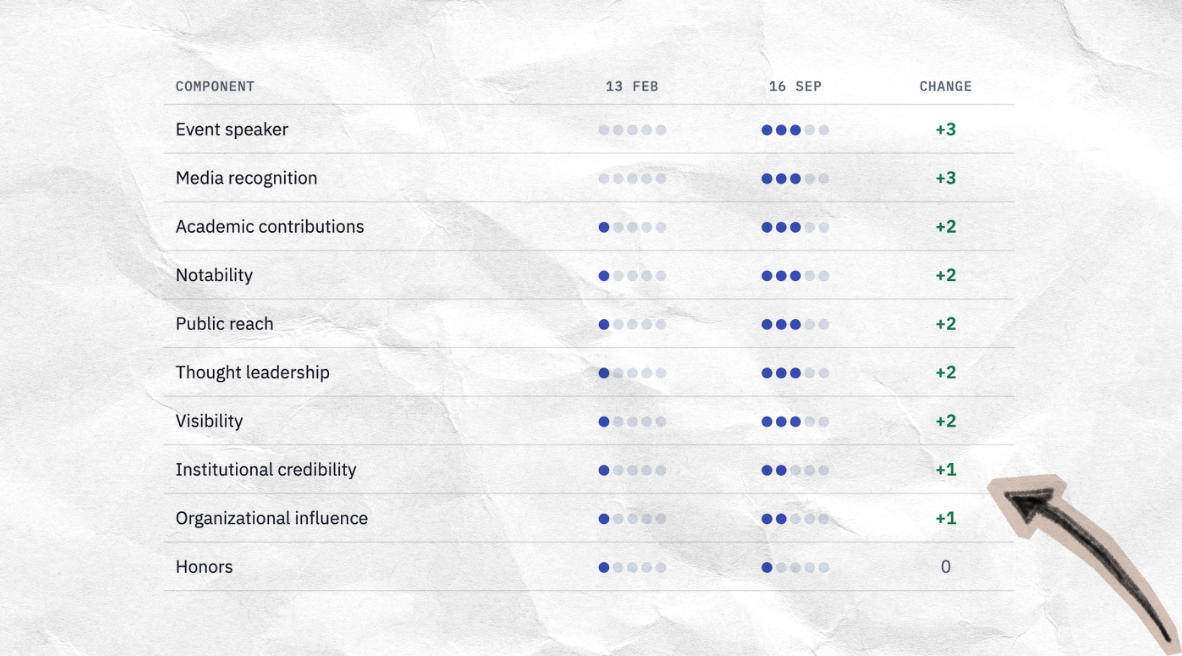
The two biggest jumps, event speaker and media recognition, both come from things that happen off LinkedIn. One keynote moved my score more than months of posting. Media recognition went from 0 to 3 in the same months I gave expert quotes to several publications. You can see them on my press page.
2. Niche topics, or where LinkedIn thinks you're an expert
For each niche topic, LinkedIn scores five factors from 1 to 4. They are your role, your tenure, your content, your education and credentials, and how others validate you.
I have 29 niche topics, and 24 of them name support or customer service directly. My strongest score 18 out of 20, for example "AI Support Agent Deployment" and "Customer Service Operations & Automation." Role and Content are where I score 4. Tenure and Education are 3 or lower almost everywhere.
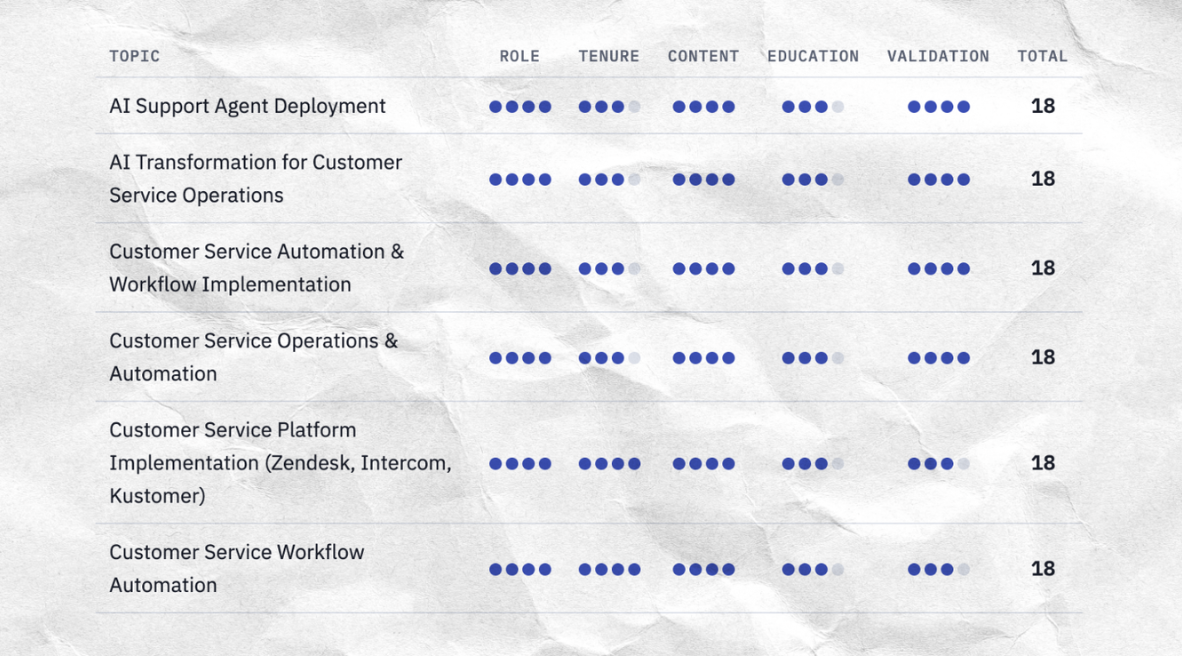
Read yours against what you want to be known for. If the list describes your past and not your direction, your content will keep being matched to your past.
3. Broad categories, or where your writing gets filed
LinkedIn also scores you on about 117 broad categories. Check whether your top category describes you. Customer service isn't one of them, so my support writing gets filed somewhere else. My top three are AI Tools & Applications (2.74), Enterprise Software & Digital Transformation (2.55), and Sales, Growth & Business Strategy (2.21).
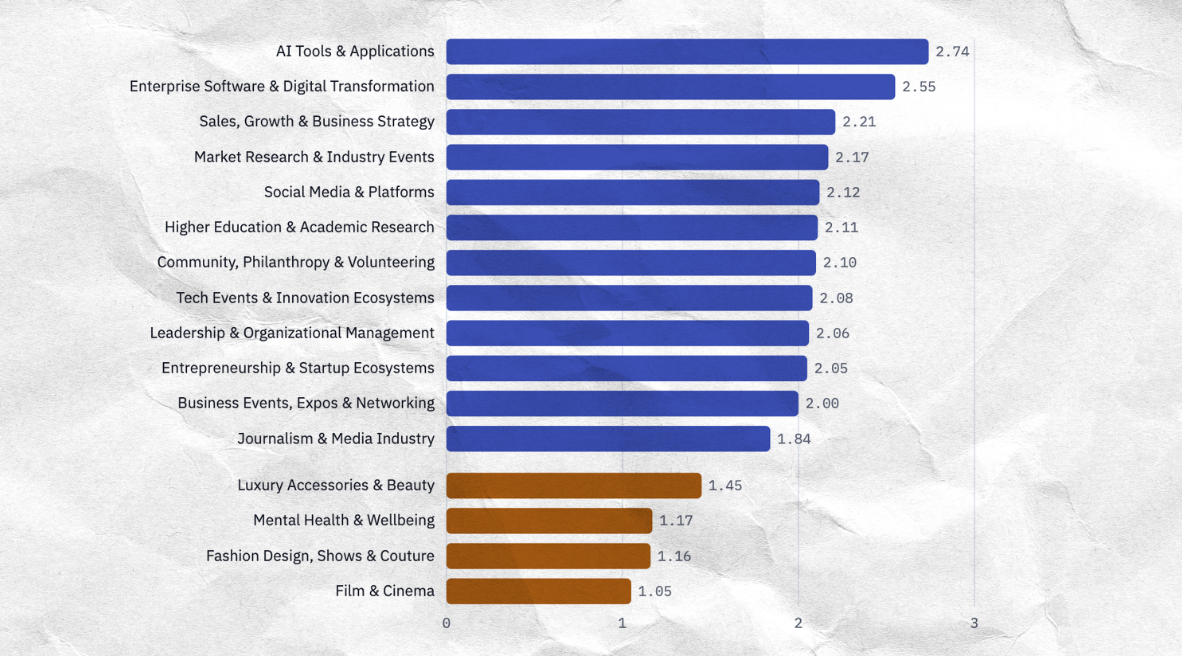
Topics I use as playful frames barely register. Fashion Design scores 1.16 and Film & Cinema 1.05, close to the minimum. They don't count toward who LinkedIn thinks I am.
The free fix. If your scores describe someone else, check your Education and Experience sections first. In 2023 I did a certification at Harvard Online and listed it as my main education. LinkedIn read me as an entry-level specialist. Certifications belong under Licenses & Certifications, not Education, and moving one costs nothing.
How LinkedIn reads the industry on your profile
The industry you pick on your profile isn't free text. It comes from a fixed LinkedIn taxonomy, Industry Codes V2, and each code sits inside a hierarchy. The same taxonomy is what advertisers use to target people by industry in Campaign Manager.
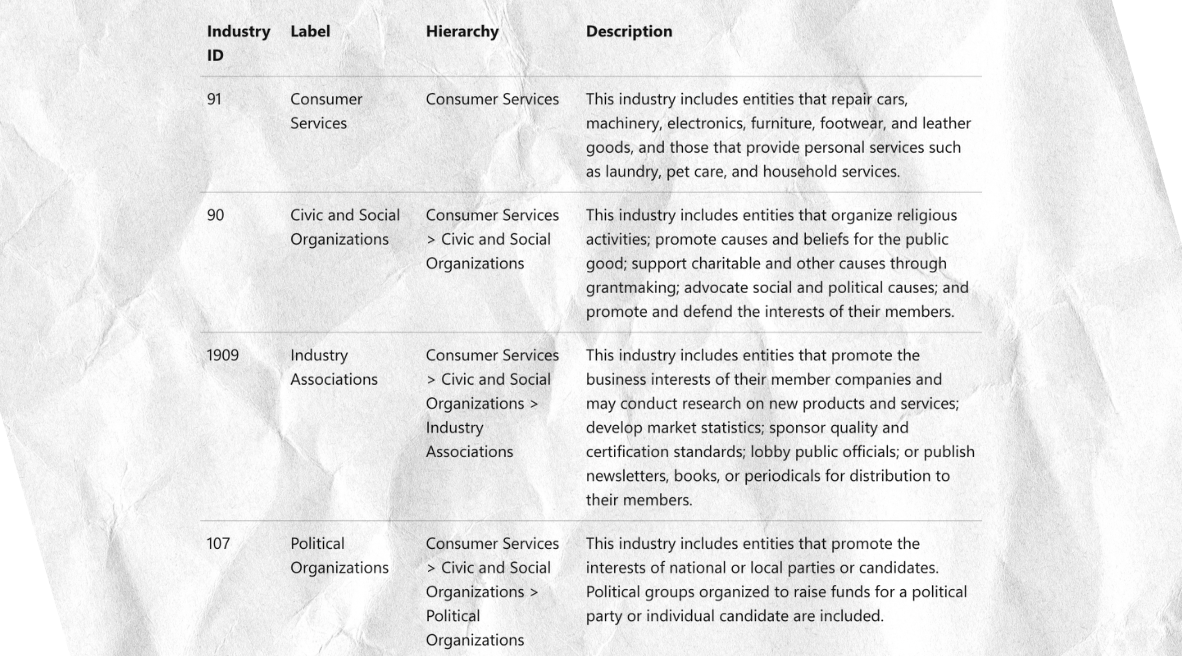
Here's the gap I found. There is no "Customer Service" industry. The closest code is "Telephone Call Centers" (ID 1931), filed under Administrative and Support Services and described as answering calls and telemarketing. For someone who writes about support operations and AI, that's the wrong neighbourhood. It's the same gap as in the credibility categories, where customer service has no home of its own.
Here's what I saw on my own account. When I changed my profile industry from IT consulting to business news, my posts started reaching more business owners and founders. Nothing else about how I wrote changed. So LinkedIn seems to read your profile, not only the post, when it decides who to show it to.
How to choose yours
- Open the Industry Codes V2 list and search for the words you want to be known for.
- Read the description, not just the label. Pick the code whose description sounds like your work.
- Check the parent in the hierarchy. That's the bigger group you'll be filed under.
- Make your headline and About section use the same vocabulary, so the signals agree.
More on LinkedIn industry codes
Why your first two paragraphs choose your audience
The words in your opening decide which professional crowd LinkedIn shows your post to. Change the vocabulary and you change the audience, even when the argument stays the same.
In March 2026, LinkedIn's engineering team described how it rebuilt the feed (Search Engine Land's summary, LinkedIn Engineering blog). It now runs on LLM embeddings, the same technology behind the AI tools you probably already use. The system turns your post into a mathematical picture of what it's about, then matches it to members whose recent activity shows interest in that topic. It can even connect topics that use different words, so what matters is the subject your opening signals, not any single keyword.
My accidental test
I wrote a post arguing that support teams carry operational knowledge that never gets documented. Strong argument, terrible engagement. The demographics showed it had gone almost entirely to knowledge managers and documentation specialists.
The opening paragraph explained why. It used "knowledge base," "articles" and "tribal knowledge," so the system sent it to knowledge-management people.
The following week I rewrote the same argument. The opening now used "support operations," "customer service" and "CSAT" (customer satisfaction score), and named Zendesk, Intercom and Freshdesk.
| Version A | Version B | |
|---|---|---|
| Opening vocabulary | knowledge base, articles, tribal knowledge | support operations, customer service, CSAT, Zendesk, Intercom, Freshdesk |
| Impressions | 1,100 | 5,600 |
Same account, same week, same quality of thinking. The only difference was the words.
My pre-publish audit
- Copy your first two paragraphs.
- List every noun and verb phrase in them.
- For each phrase, ask which professional crowd uses it most.
- If more than half point somewhere narrower than the audience you want, swap them for broader terms without changing the argument.
It sounds small. It is not small.
Why saves matter more than likes
Saves are the most underused metric on LinkedIn, and they predicted my inbound leads better than impressions did.
A like is partly a performance. You're doing it to be seen doing it. Many comments are the same, and we all know what "great post!" means. A save is private. Nobody sees your saves, and nobody saves something to impress anyone. A save means one thing. I want this later.
So I started tracking what I call the Retention Value Index (RVI). Here's the formula.
It tells you how many people out of every thousand who saw your post thought it was worth keeping.
| RVI | What it means |
|---|---|
| Below 1.0 | Consumed and forgotten |
| 1.0 to 3.0 | Genuinely useful |
| Above 3.0 | Reference material people come back to |
My numbers
- A tribal-identity post ("things nobody says out loud") scored 3.0.
- A post about hidden LinkedIn features scored 10.9.
- My analytical frameworks almost all scored below 1.0.
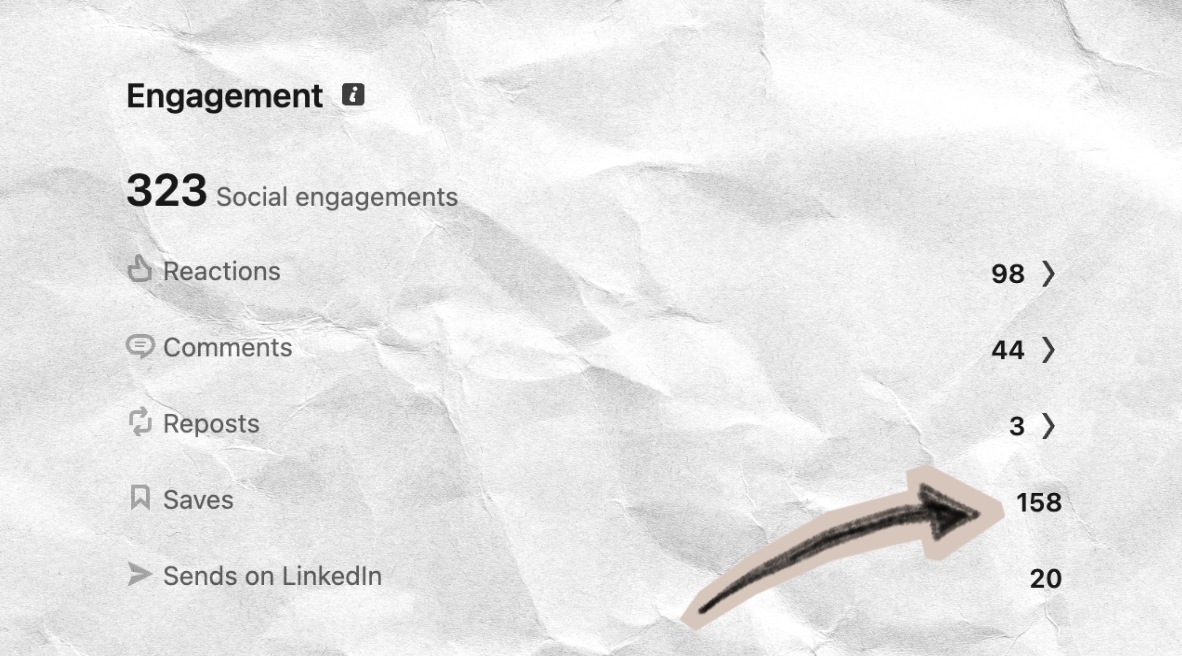
The posts with the highest RVI brought more followers, more inbound leads and more DMs than posts with three times the impressions but few saves. When someone saves your post, they put you in a mental folder called "this person knows things." That's a different relationship from a like at 11pm while scrolling.
Try it on your last 10 posts. Find saves and impressions in each post's analytics, run the formula, and sort. Your top three tell you what your audience actually wants to keep.
More on the Retention Value Index
Every number in this guide comes from my own account. Follow me on LinkedIn for more insights.Follow on LinkedIn
You don't need big numbers
Follower count is the number everyone watches, and it's the one that mattered least for me. I told you about the paid post, the consulting offer, Lorikeet and the Dixa keynote. Add one more. At 3,000 followers, an AI concierge company asked me to help with their content.
None of these came from reach. They came from the right people reading me and deciding I knew things. That's what a high save rate signals, and it's what a correctly labelled credibility file makes possible.
LinkedIn seems to be heading the same way. In October 2026 it announced a test of a separate Network feed for posts from your connections and people you follow, plus Advice Sessions, paid 1:1 consultations booked straight from your profile. Both reward people who trust you, not the size of your audience.
You can grow on LinkedIn by being entertaining and consistent and optimizing for reach. That's a valid strategy. Or you can build a small, dense audience of people who feel genuinely understood by your content, and trust that the business outcomes follow. Everything in this guide is for the second game.
Your LinkedIn checkup
Do these in order. Each one takes a few minutes, except waiting for the export.
- Request your data archive in Settings → Data privacy → Download your data
- Open "Inferred Credibility Scores" and list your top five niche topics
- Write one sentence about what you want to be known for, and mark which topics match it
- Check your top broad category. If it's wrong, review Education and Experience first
- Look up your industry in Industry Codes V2 and read its description, not just its label
- Run the four-step vocabulary audit on the opening of your next post
- Calculate the RVI of your last 10 posts and note your top three
Read your own file in two minutes
The file is hard to read because of how it's built. It has one column per snapshot date, blank cells where nothing was recorded, and two different scales (0–5 and 1–4) mixed in the same file. It took me a while to work that out. This prompt tells an AI assistant exactly how the file is structured, so it calculates instead of guessing.
Use it in any assistant that can run code (Claude or ChatGPT, for example). Upload Inferred_Credibility_Scores.csv from your export, then paste this prompt.
I'm uploading Inferred_Credibility_Scores.csv from my LinkedIn data export. Build me a report of how LinkedIn scores my credibility. Parse the file with code. Do not estimate or summarise by eye.

How the file is structured:
- Wide format. Columns are ScoreType, Topic, Category, Range, then one column per snapshot date, newest first. A blank cell means no score was recorded on that date. Use the most recent non-blank value as the current score.
- Topic names contain commas inside quotes, so use a proper CSV parser.
- ScoreType "Notability" rows: ten components scored 0–5 (Academic contributions, Event speaker, Honors, Institutional credibility, Media recognition, Organizational influence, Public reach, Thought leadership, Visibility, Notability), plus "Aggregated notability score" (0–5, continuous) and "Discrete notability tier" (1–4).
- ScoreType "Knowledge" rows: topics LinkedIn thinks I know about. Some topics have a "Topic score" and a "Topic normalized score" (1–4, continuous). Some also have five sub-scores (1–4): Content and output, Role and scope, Tenure and experience, Education and credentials, Validation and influence.

What I want in the report:
1. Notability: my current aggregated score and tier, each of the ten components, and which components changed over time and when.
2. Topics: every topic ranked by its current normalized score. Mark which topics are specific niches and which are broad categories.
3. For the topics that have sub-scores, show which of the five dimensions is strongest and weakest, and the dimension that is weakest across most topics.
4. History: any topic or component whose score moved between the earliest and latest snapshot, with the dates.
5. Three observations about what the data suggests I could change on my profile or in my activity. Tie each one to a specific row and score in the file.

Rules:
- Report only what the file contains. LinkedIn has not published how these scores are used for distribution, search or job matching. Do not claim they control reach, and label any interpretation as interpretation.
- State every scale with its number (0–5 or 1–4). Never mix the two.
- If a value is missing or ambiguous, say so instead of filling it in.
- Deliver it as a single readable page with a table for the topics and a small chart for notability over time.
Check its three observations against your own sense of your career.
Questions about your file or what to change? Write to me at kateryna@rigel.studio.
FAQ
How do I get clients on LinkedIn with a small following? Make sure LinkedIn understands what you're an expert in, write for the specific people who buy, and measure saves instead of likes. I got my first paid post at 2,000 followers and my biggest consulting offer at 2,500.
Do I need a lot of followers to make money on LinkedIn? No. What matters is whether the right people read you. Lorikeet noticed me when my posts averaged 30 to 40 likes, and Dixa invited me to give a keynote before I reached 3,000 followers.
Why are my LinkedIn posts not reaching the right people? Often LinkedIn has labelled you differently from how you see yourself. Check three things in this order. Your Inferred Credibility Scores file, the industry on your profile, and the words in your first two paragraphs.
How can I see what LinkedIn thinks I'm an expert in? Download your data in Settings → Data privacy → Download your data, then open the file "Inferred Credibility Scores." The niche topics in it are the subjects LinkedIn credits you on, each scored from 1 to 4.
Are saves or likes more important on LinkedIn? For finding clients, saves. A save is private, so it signals real interest rather than performance. Above 1.0 saves per 1,000 impressions means useful content, and above 3.0 means reference material.
Kateryna Babenko has spent 6+ years in customer service operations, as a support agent, sysadmin, data analyst, automation lead, AI consultant and software auditor. She writes about customer service software and AI. All numbers in this article come from her own LinkedIn account.
For consulting, software evaluations or speaking, reach out to kateryna@rigel.studio.